Free Fire, Garena's wildly popular battle royale game, delivers fast-paced, adrenaline-fueled action perfect for short, intense gaming sessions. Each match clocks in around 10 minutes, making it ideal for players on the go. Diamonds, the game's premium currency, unlock character, vehicle, and weapon customizations. This guide explores ways to acquire free diamonds within the game.
What are Headshots?
In Free Fire, headshots are the ultimate quick kill. A well-placed headshot instantly downs an opponent, giving you a decisive advantage. Mastering this requires a combination of optimal settings, precise techniques, and consistent practice.
Free Fire's sensitivity settings directly impact your aiming speed and accuracy. Correct settings significantly improve your headshot potential without resorting to cheats or third-party tools. Fine-tuning these settings enhances character movement and target tracking, crucial for headshots.
Best Sensitivity Settings for Headshots
Sensitivity settings are key to improving aim, especially for headshots. Adjusting these ensures smooth, precise crosshair movement.
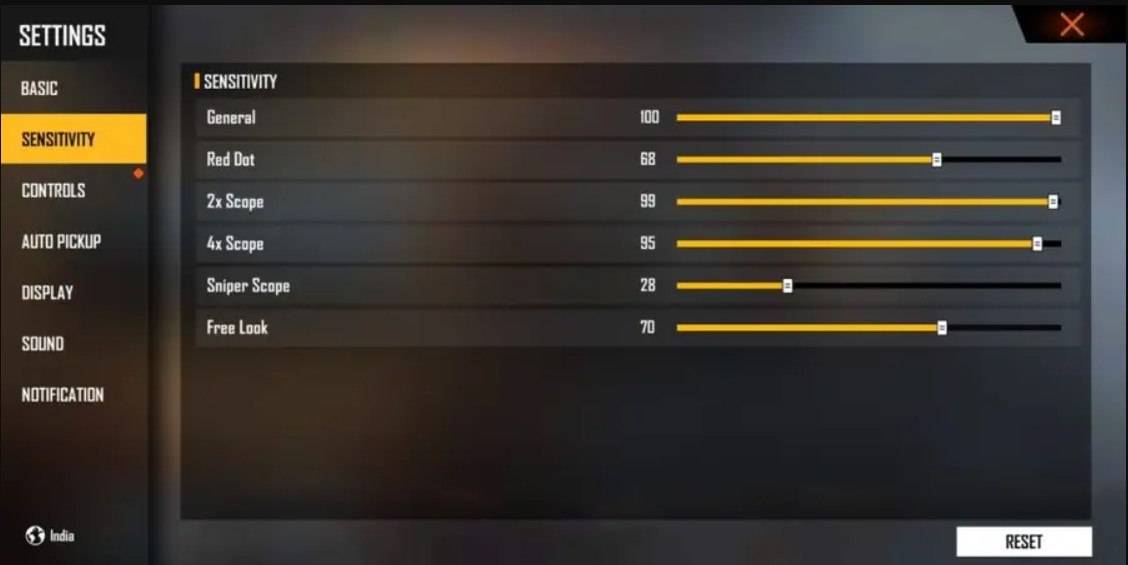
Recommended Settings: Aim Precision: Default; Left Fire Button: Always; Reload Progress on Crosshair: Off; Hold Fire to Scope: On; Grenade Slot: Double Slot; Vehicle Controls: Two-handed; Auto-parachute: On; Quick Weapon Switch: On; Quick Reload: Off; Run Mode: Classic; Free Look: On
Optimize your HUD Layout
Your Heads-Up Display (HUD) layout significantly impacts performance. A personalized setup tailored to your playstyle is essential.
Key Optimizations: Position the fire button for easy thumb access (many pros use three- or four-finger claw grips); enable "drag shoot" with a 50-70% fire button size for precise swiping; place the weapon switch button near your thumb for quick access; position crouch and jump buttons near movement controls for smooth execution of crouch/jump + shoot techniques; keep the scope button close to your index finger for quick aiming and headshot alignment.
Increase your Headshot Accuracy Using BlueStacks Tools
While mobile screens are great for navigation, larger screens offer superior aiming precision. BlueStacks, with its enhanced features, significantly boosts your headshot accuracy.
BlueStacks Advantages: Keyboard and mouse support for greater accuracy; customizable key mapping for personalized control; enhanced graphics and performance for smoother gameplay; improved sensitivity settings for fine-tuned drag shots and scoped headshots.
Experience Free Fire's enhanced gameplay on a larger screen with keyboard and mouse control using BlueStacks!



![Amy’s Ecstasy [v0.45 Final]](https://imgs.daqiang.cc/uploads/07/1719551527667e462789d0f.jpg)